

AUDAVIS - AI-Powered Documentation for Financial Statement Audits
AUDAVIS AI-powered audit documentation
Starting in 2027, AUDAVIS will offer full documentation of the financial statement audit as a user feature with AI support.
AUDAVIS guides the user through the entire audit workflow, from documenting the risk-based audit, through assessing risks and documenting controls, to linking relevant information from the permanent file, separately uploaded files and the client's accounting data.
This feature will be available in AUDAVIS starting in January 2027 (and as a preview version for selected users starting in October 2026).
Insight into AUDAVIS audit documentation
In AUDAVIS, the entire audit workflow is presented as a "guiding thread" (see the menu on the left). Industry- and case-specific questions guide the auditor through the entire financial statement audit, enabling even less experienced auditors to work on an equal footing within the audit file.

The risk assessment in the audit is mapped dynamically in AUDAVIS, and risk factors can easily be described and edited by the user.

Risks can be described precisely, and scenarios for fraudulent acts can be derived for the audit documentation.

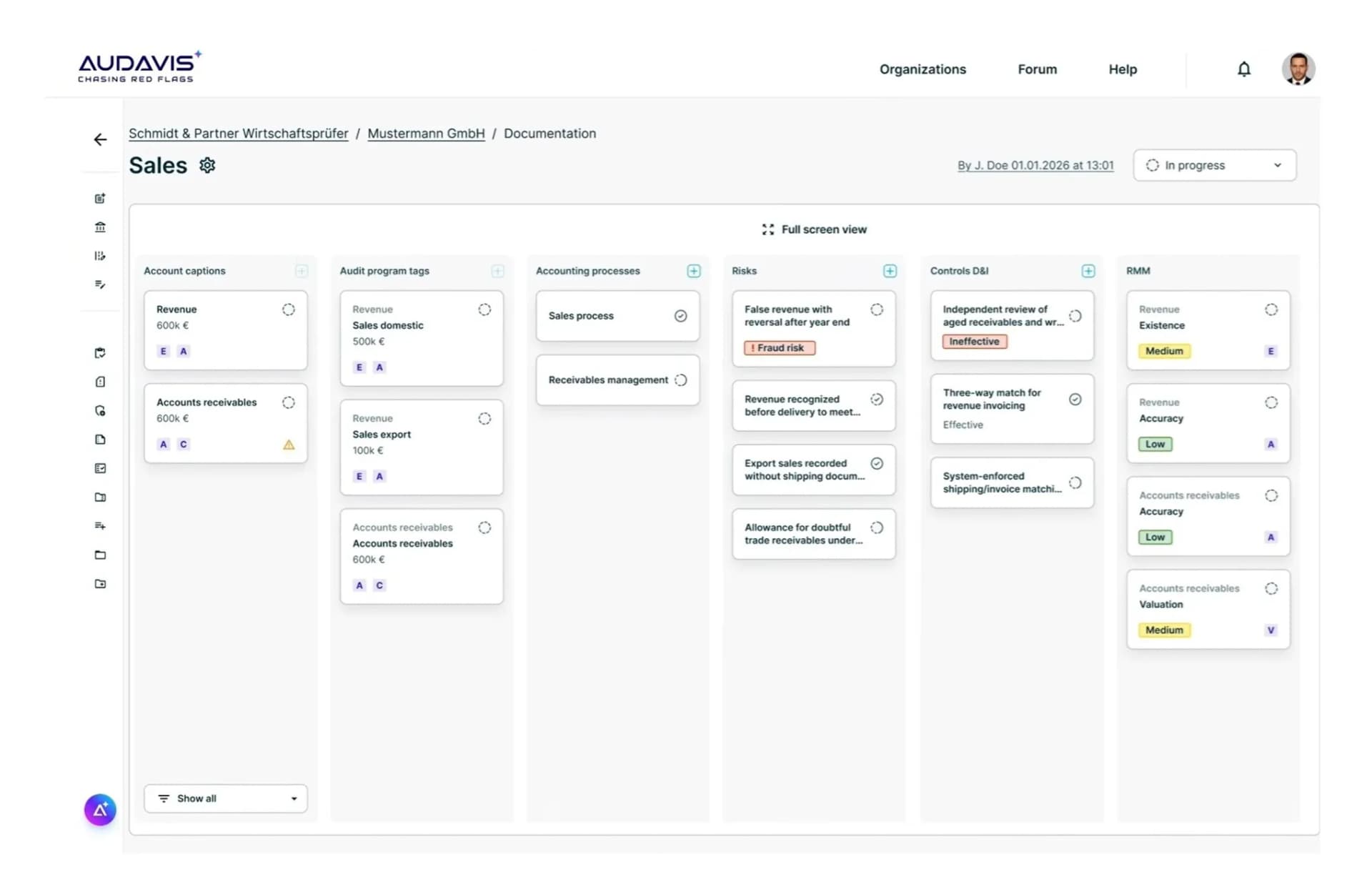
AUDAVIS maps the entire audit trail in clear charts that are visualized on a board. Risks and findings are easy to recognize by their color-coded labels.

Individual cases selected by the user become visible as graphs in context. The audit trail is accessible to the user at a glance in a visually appealing form.

Risks can be documented in an easily traceable way and classified in a two-dimensional heatmap matrix by severity (horizontal) and probability of occurrence (vertical).

Significant risks can be described in detail by the user. Evidence can be linked or uploaded as a file attachment.

The audit workflow guides the user through the audit. At the same time, the audit process always remains traceable and transparent for the user, so that orientation is never lost. Risks, procedures, etc. are distinguished by meaningful categories and can be viewed and selected in the menu at any time.

The audit trail always considers the overall context. If the user selects an audit program, a process or a specific risk, all related elements (e.g. audit procedures) are co-selected in AUDAVIS.

Selected elements can be described in the detail view. For this purpose, AUDAVIS offers a clear form logic designed by auditors.
AUDAVIS AI augments, or co-pilots, this audit documentation with the Artificial Auditor.
This Artificial Auditor provides automatic descriptions and context information drawn from the client's permanent file (uploaded files, e.g. in PDF or TIFF format) and from the accounting data (e.g. from DATEV, BMD, Abacus, Sage, SAP, Microsoft or Oracle), which AUDAVIS prepares automatically.

In addition to the Artificial Auditor and the option for users to upload files to the audit file manually, dashboards from the analytics area in AUDAVIS are also linked automatically or connected manually by the user.

The analytics dashboards provide a detailed view of the data, covering standard audit procedures that are modeled automatically as data pipelines in AUDAVIS (e.g. JET, expectation or offset account analyses) as well as analyses that users create individually and dynamically with the Talk to Data function in AUDAVIS.
A video showing an example workflow of audit documentation with AUDAVIS AI is available at the following link: https://www.youtube.com/watch?v=kBkqGLFbpew
Learn more at www.audavis.ai
AUDAVIS – the AI platform for financial statement audits. Automated working papers, risk analyses and intelligent data analytics for auditors.
Would you like to audit analytically too? Feel free to sign up here for a demo.

AI-Powered Custom Analyses for Auditors

Offset Account Analysis in Financial Statement Audits
Analyzing the posting relationships between accounts and their offset accounts is one of the most revealing audit procedures in general ledger analysis.